By
DE Editors
September 14, 2020
Get news, papers, media and research delivered. Sign up for our free newsletters.
Stay up-to-date with news and resources you need to do your job. Research industry trends, compare companies and get weekly market intelligence with Robotics 24/7.
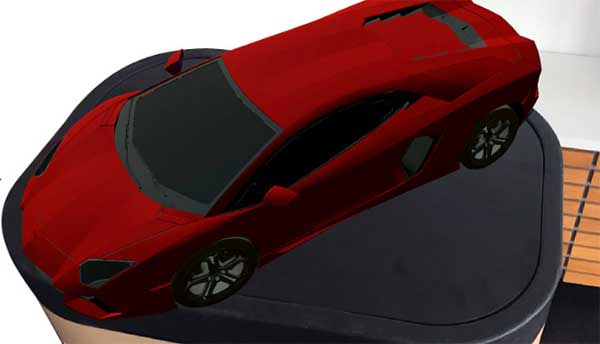
With the help of the CAD Schroer AR viewer i4 AUGMENTED REVIEW, augmented reality is now available for everyday use. This AR-App allows the display of any 3D model in a realistic environment. All the user needs is an AR-enabled smartphone or tablet. Due to the performance of today’s devices, even very complex 3D models can be used on the AR-Viewer.
The concise user interface helps the user is simple to use. After loading a 3D model, it is displayed in real space. The AR-Viewer recognizes surfaces such as tables or floors, so that the model can be placed on a surface. The user can then reduce, enlarge, rotate and move the model as usual using the standard gestures to view it from all angles.
i4 AUGMENTED REVIEW can be downloaded free of charge from the App Stores. The free app offers broad functionality for loading and viewing 3D models in augmented reality. The app can be immediately tested and comes complete with a collection of sample models.
i4 AUGMENTED REVIEW is specifically designed for the use of personal 3D models. Users can export models in OBJ or FBX format from a 3D system and load them onto their smartphone or tablet. These can then be viewed directly in the AR Viewer.
In the free version the AR-Viewer supports models of up to 4 MB for FBX files and 7MB for OBJ files. Users who want to load even larger models, such as those exported directly from a CAD system, need the PRO version. This allows large models to be loaded into Augmented Reality and viewed in all details.
Sources: Press materials received from the company and additional information gleaned from the company’s website.

DE's editors contribute news and new product announcements to Digital Engineering 24/7 and the Robotics 24/7 sites. Press releases may be sent to them via [email protected].
3D Printing Features Product AR and VR CAD Schroer Design Products Prototype Manufacture
Ultrasonic sensing enhances robotics perception
World's first omni-modal evaluation including tactile sensing for…

Cybernetix Ventures’ event kicks off Robotics Tech Week 2026 slate of events
Preview the manufacturing and warehouse components that will be on the…