NVIDIA
QUT researchers say how NVIDIA Isaac Sim and BenchBot can facilitate application development.
Get news, papers, media and research delivered. Sign up for our free newsletters.
Stay up-to-date with news and resources you need to do your job. Research industry trends, compare companies and get weekly market intelligence with Robotics 24/7.
NVIDIA
QUT researchers say how NVIDIA Isaac Sim and BenchBot can facilitate application development.
Working on robotics is full of exciting and interesting problems but also days lost to humbling problems like sensor calibration, building transform trees, managing distributed systems, and debugging bizarre failures in brittle systems.
We built the BenchBot platform at Queensland University of Technology's (QUT) Centre for Robotics (QCR) to enable roboticists to focus their time on researching the exciting and interesting problems present in robotics.
We also recently upgraded to the new NVIDIA Omniverse-powered NVIDIA Isaac Sim, which has bought a raft of significant improvements to the BenchBot platform. Whether robotics is your hobby, academic pursuit, or job, BenchBot along with NVIDIA Isaac Sim capabilities enables you to jump into the wonderful world of robotics with only a few lines of Python.
In this post, we share how we created BenchBot, what it enables, where we plan to take it in the future, and where you can take it in your own work. Our goal is to give you the tools to start working on your own robotics projects and research by presenting ideas about what you can do with BenchBot. We also share what we learned when integrating with the new NVIDIA Isaac Sim.
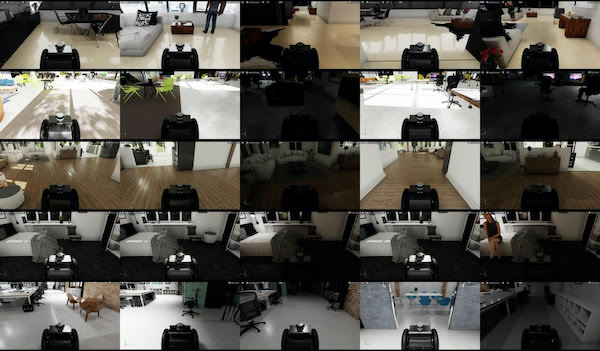
We will also supply context for our Robotic Vision Scene Understanding (RVSU) challenge, currently in its third iteration. The RVSU challenge is a chance to get hands-on in trying to solve a fundamental problem for domestic robots -- how can they understand what is in their environment and where. By competing, you can win a share in prizes, including NVIDIA A6000 GPUs and $2,500 (U.S.) cash.
BenchBot addressed a need in our semantic scene understanding research. We’d hosted an object-detection challenge and produced novel evaluation metrics, but we needed to expand this work to the robotics domain:
We made the BenchBot platform to enable you to focus on these big questions, without becoming lost in the sea of challenges typically thrown up by robotic systems. BenchBot consists of many moving parts that abstract these operational complexities away (Figure 2).
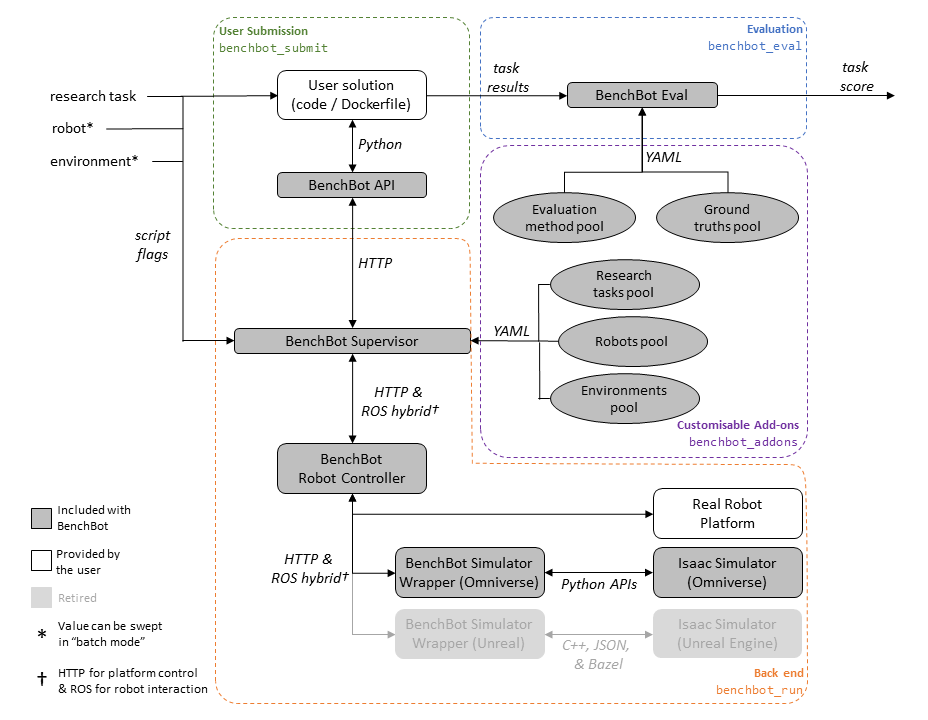
Here are some of the key components and features of the BenchBot architecture:
All our code is open-source under an MIT license. For more information, see the PDF download "BenchBot: Evaluating Robotics Research in Photorealistic 3D Simulation and on Real Robots."
A lot of moving parts isn’t necessarily a good thing if they complicate the user experience, so designing the user experience was also a central focus in developing BenchBot.
There are three basic commands for controlling the system:
benchbot_install - -help
benchbot_run - -help
benchbot_submit - -help
The following command helps builds powerful evaluation workflows across multiple environments:
benchbot_batch - -help
Here’s a simple Python command for interacting with the sensorimotor capabilities of a robot:
python
from benchbot_api import Agent, BenchBotclass MyAgent(Agent):
def is_done(self, action_result):
…
def pick_action(self, observations, action_list):
…
def save_result(self, filename, empty_results, results_format_fns):
…BenchBot(agent=MyAgent()).run()
With a simple Python API, world-class photorealistic simulation, and only a handful of commands needed to manage the entire system, we were ready to apply BenchBot to our first big output: the RVSU challenge.
The RVSU challenge prompts researchers to develop robotic vision systems that understand both the semantic and geometric aspects of the surrounding environment. The challenge consists of six tasks, featuring multiple difficulty levels for object-based, semantic, simultaneous localization and mapping (SLAM) and scene change detection (SCD).
The challenge also focuses on a core requirement for household service robots: they need to understand what objects are in their environment, and where they are. This problem in itself is the first challenge captured in our semantic SLAM tasks, where a robot must explore an environment, find all objects of interest, and add them to a 3D map.
The SCD task takes this a step further, asking a robot to report changes to the objects in the environment at a different point in time. My colleague David Hall presented an excellent overview of the challenge in the video below:
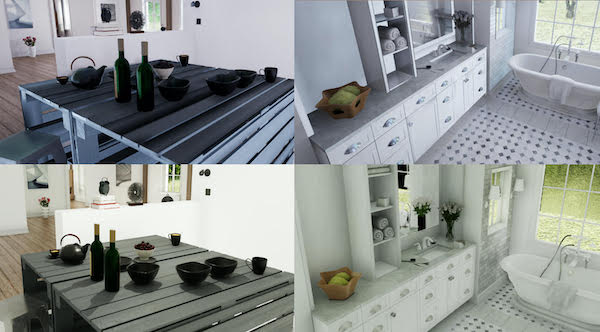
Recently, we upgraded BenchBot from using the old Unreal Engine-based NVIDIA Isaac Sim to the new Omniverse-powered NVIDIA Isaac Sim. This brought a number of key benefits to BenchBot, leaving us excited about where we can go with Omniverse-powered simulations in the future. The areas in which we saw significant benefits included the following:
The qcr/benchbot_sim_omni repository captures our learnings in transitioning to the new NVIDIA Isaac Sim, and also works as a standalone package outside the BenchBot ecosystem. The package is a customizable HTTP API for loading environments, placing robots, and controlling simulations. It serves as a great starting point for programmatically running simulations with NVIDIA Isaac Sim.
We welcome pull requests and suggestions for how to expand the capabilities of this package. We also hope it can offer some useful examples for starting your own projects with NVIDIA Isaac Sim, such as the following examples.
Opening environments first requires a running simulator instance. A new instance is created by instantiating the SimulationApp class, with the open_usd option letting you pick an environment to open initially:
python
from omni.isaac.kit import SimulationAppinst = SimulationApp({
"renderer": "RayTracedLighting",
"headless": False,
“open_usd”: MAP_USD_PATH,
})
It’s worth noting that only one simulation instance can run per Python script, and NVIDIA Isaac Sim components must be imported after initializing the instance.
Select a different stage at runtime by using helpers in the NVIDIA Isaac Sim API:
python
from omni.isaac.core.utils.stage import open_stage, update_stageopen_stage(usd_path=MAP_USD_PATH)
update_stage()
Before starting a simulation, load and place a robot in the environment. Do this with the Robot class and the following lines of code:
python
from omni.isaac.core.robots import Robot
from omni.isaac.core.utils.stage import add_reference_to_stage, update_stageadd_reference_to_stage(usd_path=ROBOT_USD_PATH, prim_path=ROBOT_PRIM_PATH)
robot = Robot(prim_path=ROBOT_PRIM_PATH, name=ROBOT_NAME)
robot.set_world_pose(position=NP_XYZ * 100, orientation=NP_QUATERNION)
update_stage()
Simulations in NVIDIA Isaac Sim are controlled by the SimulationContext class:
python
from omni.isaac.core import SimulationContext
sim = SimulationContext()
sim.play()
Then, the step method gives fine-grained control over the simulation, which runs at 60Hz. We used this control to manage our sensor publishing, transform trees, and state detection logic.
Another useful code example we stumbled upon was using the dynamic_control module to get the robot’s ground truth pose during a simulation:
python
from omni.isaac.dynamic_control import _dynamic_control
dc = _dynamic_control.acquire_dynamic_control_interface()
robot_dc = dc.get_articulation_root_body(dc.get_object(ROBOT_PRIM_PATH))
gt_pose = dc.get_rigid_body_pose(robot_dc)
Hopefully these code examples are helpful to you in getting started with NVIDIA Isaac Sim. With not much more than these, we’ve had some impressive results:
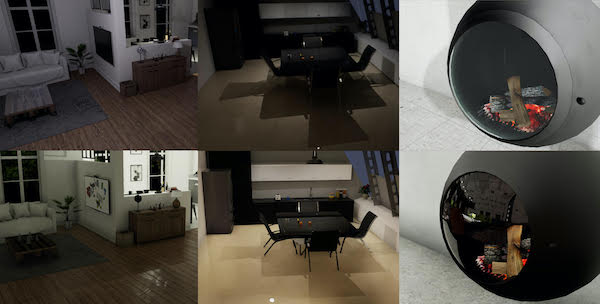
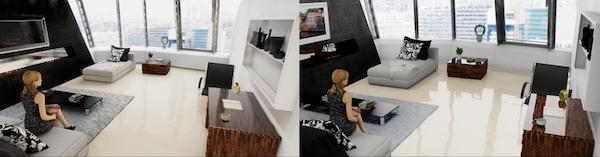
Figures 3, 4, and 5 show some of our favorite visual improvements from making the transition to Omniverse.
Although semantic scene understanding is a focal point of our research and the origins of its use in research, BenchBot’s applications aren’t limited solely to this domain. BenchBot is built using a rich add-on architecture allowing modular additions and adaptations of the system to different problem domains.
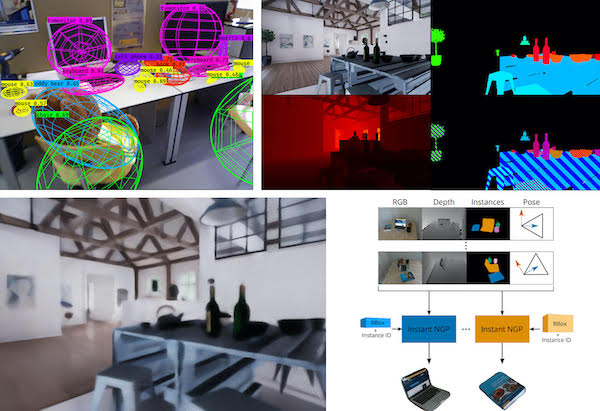
The visual learning and understanding research program at QCR has started using this flexibility to apply BenchBot and its Omniverse-powered simulations to a range of interesting problems. Figure 6 shows a few areas where we’re looking at employing BenchBot:
We’ve made BenchBot with a heavy focus on being able to fit it to your research problems. As much as we’re enjoying applying it to our research problems, we’re excited to see where others take it. Creating your own add-ons is documented in the add-ons repository, and we’d love to add some third-party add-ons to the official add-ons organization.
We hope this in-depth review has been insightful, and helps you step into robotics to work on the problems that excite us roboticists.
We welcome entries for the RVSU challenge, whether your interest in semantic scene understanding is casual or formal, academic or industrial, competitive or iterative. We think you’ll find competing in the challenge with the BenchBot system an enriching experience. You can register for the challenge, and submit entries through the EvalAI challenge page.
If you’re looking for where to go next with BenchBot and Omniverse, here are some suggestions:
At QCR, we’re excited to see where robotics is heading. With tools like BenchBot and the new Omniverse-powered NVIDIA Isaac Sim, there’s never been a better time to jump in and start playing with robotics.

Dr. Ben Talbot is a roboticist and a researcher in Australia, developing the next generation of robots. He is working to advance robot capabilities and use them to extend the real-world applications. Talbot's research interests include cognitive robotics (how robots think and reason), artificial intelligence, and new applications. He is currently a research fellow at the Queensland University of Technology working at QUT Centre for Robotics (QCR), and he previously worked in the Australian Centre for Robotic Vision (ACRV).
Dr. David Hall is a research fellow at QUT whose long-term goal is to enable robots to cope with the unpredictable real world. He has worked as part of the robotic vision challenge group within the ACRV and QCR designing challenges, benchmarks, and evaluation measures that assist emerging areas of robotic vision research such as the probabilistic object detection (PrOD) and robotic vision scene understanding (RVSU).
Hall's current research focuses on using implicit representations of objects for high-fidelity semantic maps.

Niko Suenderhauf is an associate professor and chief investigator of the QCR in Brisbane, Australia, where he leads the Visual Understanding and Learning program. He is also deputy director of research at the newly established ARC Research Hub in Intelligent Robotic Systems for Real-Time Asset Management, starting this year.
Suenderhauf was chief investigator of the Australian Centre for Robotic Vision from 2017 to 2020. He conducts research in robotic vision, at the intersection of robotics, computer vision, and machine learning.
Suenderhauf's research interests focus on scene understanding, object-based semantic SLAM, robotic learning for navigation and interaction, uncertainty, and reliability of deep learning in open set conditions.
Editor's note: This article reposted with permission from NVIDIA.
A walkthrough of the Queensland University of Technology's Centre of Robotics.
GENISOM AI makes ICRA debut at conference in Vienna
World's first omni-modal evaluation including tactile sensing for…

Ultrasonic sensing enhances robotics perception
North America’s largest automation and robotics event takes place June 22-25